WindChaser icon

WindChaser Help

Everything you need to get going.

โ„น๏ธ Find out more about the app & creator โ†“

How can we help?

WindChaser only sends you alerts when conditions match your settings, so it's worth getting these right.

  • 1Tap on the Hamburger โ˜ฐ icon in the top right of the screen
  • 2Click on Profile in the buttons that appear
  • 3This shows your current settings
  • 4Click on the Edit button and you will be able to change your:
    • alert options
    • your time zone
    • your weight (which is currently unused by the app)
    • your minimum and maximum desired wind
    • the times you can kite
  • 5Once you have set these as you desire, hit Save Changes
๐Ÿ’ก Your wind range should reflect your kite quiver. If you only have a 12m, set your range narrower than someone with multiple kite sizes.

Your password ensures that only you control when you get alerts and chat with other kiters. Keep it safe. Keep it secure.

  • 1Tap on the Hamburger โ˜ฐ icon in the top right of the screen
  • 2Click on Profile in the buttons that appear
  • 3This shows your current settings
  • 4Scroll down to Change Password
  • 5Enter a New password that only you know โ€” it's up to you how complex you make it. It's stored encrypted so no-one other than you will know it
  • 6Confirm your password to ensure you haven't made a typo
  • 7Click Set password
โš ๏ธ Keep your password safe, although you can always reset it by hitting Forgot your Password on the login screen.

WindChaser checks conditions at your favourite spots every day at 7am your time and can notify you two ways:

๐Ÿ“ง Email alerts โ€” sent to your registered email address when conditions look good. No extra setup needed.

๐Ÿ“ฑ Push notifications โ€” instant alerts directly to your phone's home screen. Requires the app to be installed (see the install topic below). Push is faster and doesn't clog your inbox.

๐Ÿ’ก You can choose Push only, Email only, Both, or turn alerts off entirely โ€” in Profile โ†’ Edit โ†’ Alert method.
โš ๏ธ Push notifications only work when WindChaser is installed as an app on your home screen. If you're just using the browser, you'll need email alerts.

WindChaser is a Progressive Web App โ€” you install it from your browser, no App Store or Google Play needed.

๐Ÿค– Android (Chrome):

  • 1Open windchaser.onrender.com in Chrome
  • 2Tap the three-dot menu โ‹ฎ (top right)
  • 3Tap "Add to Home screen" โ†’ Install
  • 4Open the app and tap "Enable alerts on this device"

๐ŸŽ iPhone / iPad (Safari):

  • 1Open windchaser.onrender.com in Safari (not Chrome)
  • 2Tap the Share button โฌ† at the bottom of the screen
  • 3Tap "Add to Home Screen" โ†’ Add
  • 4Open the app and tap "Enable alerts on this device"
โš ๏ธ iOS requires version 16.4 or later for push notifications from web apps.

Favouriting a spot means WindChaser will monitor conditions there for you.

  • 1From the My Spots screen (opened by hitting the hamburger โ˜ฐ icon in the top right), tap + Find / Add Spot
  • 2Browse around the map using a single finger to scroll around the map and two fingers to zoom in and out
  • 3If your spot is already in the database you will see an upside-down teardrop icon there. (If there isn't a spot where you need one, see the next help topic to find out how to create one yourself)
  • 4Click on it and you will be taken to that spot's card
  • 5There you can view details to see how wind direction and tidal states have been set for it
  • 6Click on โ˜† Add to Favourites to favourite the spot
  • 7Once you have favourited a spot, it will appear on your My Spots dashboard
  • 8As long as you haven't used up all of your alert slots, you can then click the ๐Ÿ”” Alert Me toggle and from tomorrow you will be alerted
๐Ÿ’ก If you only favourite a spot, you won't get alerts for it. But you will still be able to see conditions there and whether they meet your preferences by looking at the spot's card on your My Spots dashboard.
โš ๏ธ You can also scroll through the screen below the map and see a card for every spot in the database. We wouldn't recommend finding your spot that way โ€” there aren't currently any filters or search available, so the map is the better approach.

If your local spot isn't listed, you can easily add it yourself.

โš ๏ธ Please check first โ€” your spot may already exist in a slightly different place on the map. Duplicate spots split the community and mean fewer people in your spot's chat. If you think a spot has been set up incorrectly (wrong wind directions or tidal settings), please contact admin@windchaser.info.

If it genuinely isn't there:

  • 1Go to the Kite Spots screen via the hamburger โ˜ฐ menu โ†’ Find Spots (you're probably already there ๐Ÿ™‚)
  • 2Tap on the + Add New Spot button
  • 3A new screen Add New Kite Spot will open
  • 4Scroll around on the map to find the exact location of your spot
  • 5Once in the right place, tap on the map to create the teardrop icon
  • 6You may need to scroll the whole screen down โ€” be careful not to scroll within the map or your spot will scroll out of view
  • 7Set up the appropriate wind direction on the compass rose. Note that only Perfect and Good directions are used when calculating whether the wind is suitable for kiting
  • 8Set up suitable tides. At very high tides there may be insufficient space to land a kite; at low tides dangerous rocks may be exposed. Note: the tide range is calculated against astronomical tides (very high tides, not storm surges)
  • 9Configure the season for the spot if applicable โ€” some spots have restricted seasons due to things like migrating birds
  • 10Click Add Spot and the app will immediately fetch weather and tide data for your spot. Voilร !

Each spot has its own group chat โ€” a space to coordinate sessions, share conditions, and connect with the local kiting community.

  • 1From your dashboard, tap a spot you've favourited
  • 2Tap the ๐Ÿ’ฌ Chat button
  • 3Type your message and tap Send
๐Ÿ’ก Chat is visible to everyone who has favourited that spot. Please be kind and don't share any personal or private information.
โš ๏ธ This calculation is only indicative. You should always check the actual wind at the spot and what other riders are using. Some kite brands generate more power per square meter than others so please bear that in mind when making a selection.
  • 1We use a formula to calculate the kite sizes
  • 2The formula is as follows: riders weight in kilograms / wind in knots ร— 2.3
  • 3Of course this isn't massively scientific, but it seems to generate reasonable approximations
  • 4We then round down, and select the closest typical size available
  • 5The wind strength is a combination of the average wind strength (70%) and gust strengths (30%)
  • 6This is done to balance for very gusty winds or spots

WindChaser costs less than a cup of coffee a month (ยฃ3). Payment is handled securely by Stripe โ€” your card details never touch our servers.

You don't need to do anything to get started. When you register you get a free trial, and you only need to add your card details before the trial ends.

  • 1A few days before your trial ends you'll receive an email from WindChaser with an Add payment details button
  • 2Click that button โ€” it takes you to Stripe's secure checkout page
  • 3Enter your card details and confirm
  • 4That's it โ€” your card is saved and you'll be charged ยฃ3 automatically on the 25th when your trial ends

After that, on the 22nd of each month you'll get a short reminder email letting you know ยฃ3 will be taken in 3 days. If you're happy to continue, there's nothing to do โ€” the payment happens automatically on the 25th.

๐Ÿ’ก Your card details are handled entirely by Stripe and are never stored on WindChaser's servers. You can update your card details at any time via the link in the reminder email.

You can cancel any time โ€” no questions asked, no hidden hurdles. There are two ways to do it:

Option 1 โ€” from the reminder email (easiest):

  • 1On the 22nd of each month you'll receive a renewal reminder email
  • 2Click the Cancel my membership button in that email
  • 3Your subscription is cancelled immediately โ€” no further charges

Option 2 โ€” from within the app:

  • 1Tap the hamburger โ˜ฐ icon and go to Profile
  • 2Scroll down to the billing section and tap Cancel my membership
  • 3Confirm the cancellation

Whichever option you choose, your account stays fully active until the 1st of the following month โ€” so you keep access to everything you've paid for.

We'll be sorry to see you go. If you have any suggestions for how WindChaser could be better, please reach Ken at admin@windchaser.info โ€” it all genuinely helps.

๐Ÿ’ก Changed your mind before the 1st? You can reverse a cancellation from your Profile page and your subscription will continue as normal.

About WindChaser & the creator

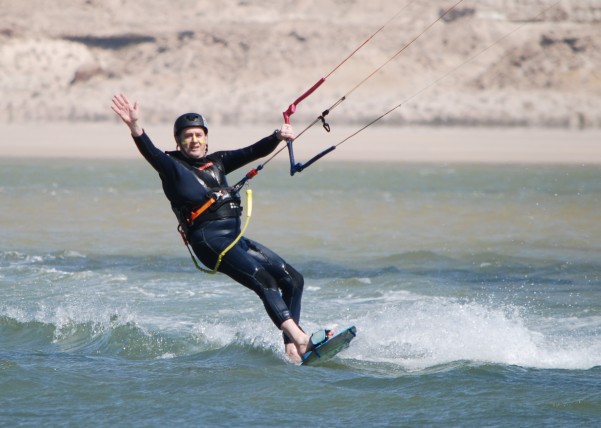
Ken kitesurfing

Hi. My name is Ken, and I am the creator of this application. It started as a passion project, just for me. I live on the North East coast in England, and the wind blows offshore almost all of the time. So much so that I gave up scanning weather apps to see if the wind was right for my beach โ€” and then one day I almost missed a fantastic session because I hadn't checked. So I built WindChaser.

So I commit that it will NEVER be infested with ads. And it will NEVER cost you more a month than a single cup of coffee at my local coffee shop.

If you have any suggestions, or just want to make contact, please reach me at admin@windchaser.info.

๐Ÿ‡ฌ๐Ÿ‡ง UK-focused for now: Tides and times may not be accurate outside the UK โ€” this is on the fix list.
๐Ÿš€ Create an account Already registered? Log in

No app store needed ยท No spam